Glunova Biotech
SO-ARM101 Robot Arm Kit for Hugging Face LeRobot, 6-Axis Leader + Follower Arms, 30 kg·cm Bus Servos, Dual Cameras (Hiwonder)
SO-ARM101 Robot Arm Kit for Hugging Face LeRobot, 6-Axis Leader + Follower Arms, 30 kg·cm Bus Servos, Dual Cameras (Hiwonder)
Couldn't load pickup availability
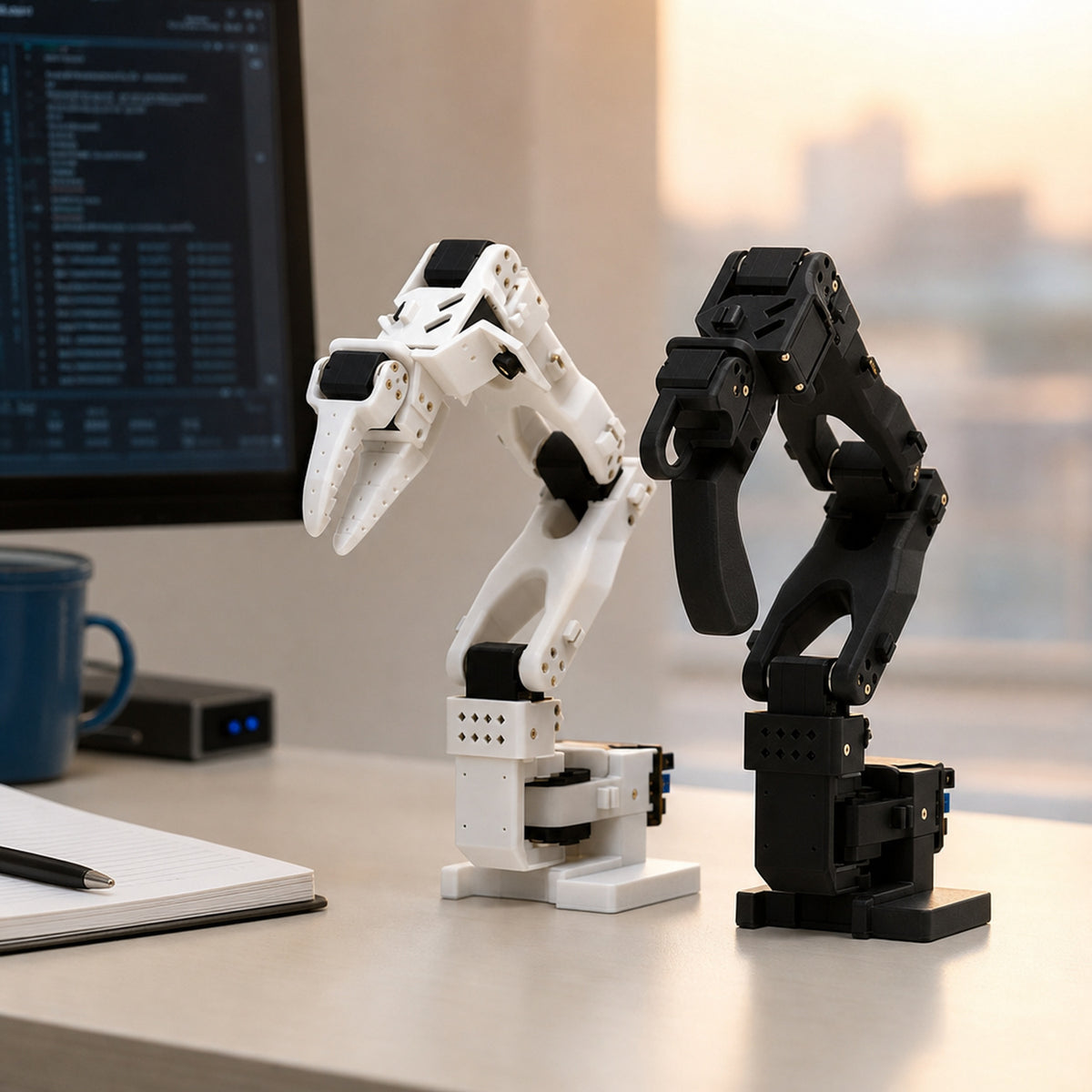
The SO-ARM101 is a low-cost, open-source 6-axis desktop robot arm kit built for Hugging Face LeRobot: you move a leader arm by hand, an identical follower arm copies it, the cameras record what happened, and that data trains an imitation-learning policy (ACT, Diffusion Policy, Pi0, SmolVLA) so the follower arm can do the task on its own.
This kit gives you a complete leader–follower pair of SO-101 arms, the 12 V bus servos, the USB servo boards and the power supplies needed to record teleoperation demonstrations and train an imitation-learning policy with Hugging Face LeRobot. Assembled kits arrive calibrated and ready to plug into a laptop; the DIY kit ships every component except the 3D-printed arm parts, which you print from the open-source STL files.
What can you use it for?
- Imitation learning and VLA (vision-language-action) research on a desk instead of a lab
- Recording teleoperation datasets and publishing them to the Hugging Face Hub
- Teaching embodied-AI, robotics and ML courses: one kit per bench, LeRobot tutorials included
- Pick-and-place, sorting and stacking demos for portfolios, hackathons and YouTube
- Testing new policies (ACT, Diffusion, Pi0, GR00T) on real hardware before scaling up
- Dual-arm bimanual manipulation experiments with the four-arm kit
Who is it for?
ML engineers and students who want to move from simulation to real robot data, university and vocational robotics labs, makerspaces, and hobbyists who want the cheapest hardware that the LeRobot community actually uses.
Compatibility
- Software: Hugging Face LeRobot (so101 robot and teleop configs), Python 3.10+, Windows or Ubuntu; runs on a laptop, Raspberry Pi 5 or NVIDIA Jetson
- Servos: Feetech / STS-compatible bus protocol; the SO-ARM101 servo set and STS3215 servos sold in this store are drop-in spares
- Cameras: standard USB UVC cameras, so any OpenCV-compatible webcam can be added as an extra view
- 3D files: open-source SO-101 STL / STEP files for the DIY kit and for printing custom grippers or mounts
- Power: 100–240 V mains adapters with 12 V 5 A output; plug type follows the destination country
Getting started: from unboxing to your first LeRobot dataset
- Unbox and clamp: fix each arm to the desk edge with the supplied G-clamps, plug the 12 V adapter into each BusLinker board, connect both boards to the PC over USB-C.
- Install LeRobot: clone the lerobot repository, create a Python environment, install with the feetech extra, and find the two serial ports (one per arm).
- Calibrate: run the calibration command for the leader and follower once; the arms are pre-assembled and pre-tuned, so this takes about two minutes per arm.
- Teleoperate: launch the teleop script and move the leader arm; the follower mirrors it in real time. Add the wrist camera (Standard) and overhead camera (Advanced) to the config.
- Record a dataset: record 30–50 episodes of one task (for example 'put the red block in the box'), then push the dataset to your Hugging Face Hub account.
- Train and deploy: train an ACT or Diffusion policy on a GPU (Colab works), copy the checkpoint back, and run the policy so the follower arm performs the task autonomously.
Specifications
| Model | Hiwonder SO-ARM101 (open-source SO-101 design by TheRobotStudio / Hugging Face) |
|---|---|
| Degrees of freedom | 6 per arm (5 joints + gripper); leader and follower arms are kinematically identical |
| Servos | Follower: 6 × HX-30HM 30 kg·cm 12 V bus servos; Leader: 6 × HX-10HM 10 kg·cm bus servos; 12-bit magnetic encoders, 360° position feedback |
| Servo protocol | Feetech / STS-compatible half-duplex TTL serial bus, 1 Mbps, natively supported by LeRobot |
| Controller | BusLinker V3.0 servo bus board, USB-C to PC, 12 V DC input, one board per arm |
| Cameras | Standard kit: 480p wide-angle wrist camera; Advanced kit adds 1080p (2 MP) wide-angle overhead camera on a desk stand |
| Arm material | PLA 3D-printed structure (white follower, black leader), metal servo horns |
| Dimensions | Leader 111 × 239 × 525 mm, 697 g; Follower 111 × 173 × 532 mm, 704 g; camera stand 166 × 258 × 527 mm, 1178 g |
| Power | 2 × 12 V 5 A adapters (DC 5.5 × 2.5 mm), one per arm |
| Host PC | Windows or Ubuntu, USB serial; Python / LeRobot; runs on a laptop, Raspberry Pi 5 or Jetson |
| Software | Hugging Face LeRobot (ACT, Diffusion Policy, Pi0, SmolVLA, Isaac GROOT), Hiwonder PC servo tool, tutorials and 3D print files |
| Package | DIY 5.23 kg; Starter 4.33 kg; Standard 4.38 kg; Advanced 5.6 kg (512 × 240 × 225 mm) |
What's in the box
- Servo Set (12 servos + horns, no 3D-printed parts): 6 × HX-30HM 30 kg·cm 12 V bus servos, 6 × HX-10HM bus servos, 14 metal main horns, 12 metal secondary horns
- DIY Kit (all parts, print the arms yourself): 12 servos and horns as above, 2 × BusLinker V3.0 boards, 2 × 12 V 5 A adapters, 4-port USB hub, 4 × 2" G-clamps, 2 × USB-C cables, camera desk stand, servo cables (3 × 100 mm, 5 × 160 mm, 7 × 200 mm), 2 screwdrivers, cable ties, nylon standoffs and the complete screw set; STL files for the arms are downloadable (you print them, about 1 kg of PLA)
- Starter Kit (assembled leader + follower, no cameras): 1 × assembled leader arm (black), 1 × assembled follower arm (white) with BusLinker boards fitted, 2 × 12 V 5 A adapters, 4-port USB hub, 4 × G-clamps, 2 × USB-C cables, spare servo cables, horns, cable ties, 2 screwdrivers, screw pack
- Standard Kit (assembled + wrist camera): Everything in the Starter Kit plus a 480p wide-angle wrist camera with mount and 1 m USB cable
- Advanced Kit (assembled + wrist camera + overhead camera on stand): Everything in the Standard Kit plus a 1080p (2 MP) wide-angle overhead camera, camera desk stand, camera bracket and a second USB cable
- Dual-Arm Kit (2 leader + 2 follower arms + cameras): 2 × leader arms, 2 × follower arms, 4 × BusLinker boards and adapters, wrist cameras, overhead camera with stand, USB hub, clamps, cables and accessories for bimanual setups
Frequently asked questions
What is the difference between the SO-ARM101 kits?
Servo Set: only the 12 servos and horns, for people who already have printed parts. DIY Kit: every component except the 3D-printed arm parts, which you print from the free STL files. Starter Kit: both arms assembled and calibrated, no cameras. Standard Kit: adds the wrist camera for eye-in-hand data. Advanced Kit: adds a second, overhead 1080p camera on a stand so you record two views, which most LeRobot tutorials assume. Dual-Arm Kit: two complete leader–follower pairs for bimanual tasks.
Which kit should I buy for LeRobot imitation learning?
The Advanced Kit. Policies such as ACT train much better with a wrist view and a fixed overhead view, and that kit includes both cameras, the stand and all cables. If you already own a good USB webcam and a tripod, the Standard Kit is enough.
Is this compatible with Hugging Face LeRobot?
Yes. The SO-ARM101 uses the open-source SO-101 geometry and Feetech-protocol bus servos, so it works with the stock LeRobot so101_follower and so101_leader configurations without code changes. Hiwonder also ships a PC tool for setting servo IDs, offsets and limits.
Do I need a GPU or a powerful computer?
Teleoperation and dataset recording run on any laptop, a Raspberry Pi 5 or a Jetson. Training a policy is faster on a GPU, but a free Google Colab session is enough for the standard ACT tutorial.
How much can it lift and how far does it reach?
The follower uses 30 kg·cm servos, roughly three times the torque of the 7.4 V servos in basic SO-100 builds, and comfortably handles wooden blocks, cups and small tools of a few hundred grams within its roughly 40 cm workspace. It is a learning platform, not an industrial arm.
Is it assembled and calibrated?
Starter, Standard, Advanced and Dual-Arm kits arrive assembled, wired and factory-calibrated; you clamp them to the desk, plug in power and USB and start. The DIY Kit requires printing the parts and about three to four hours of assembly following the video guide.
What about power plugs in my country?
Each arm needs one 12 V 5 A adapter. The adapters are 100–240 V; we ship the plug type for your shipping address, or include a travel adapter where the exact type is unavailable.
What documentation is included?
Hiwonder's LeRobot course: hardware setup, Ubuntu and Windows environment, assembly video (for the DIY kit), calibration, teleoperation, data collection, ACT training and deployment, plus the 3D files and servo tool. Hugging Face's own LeRobot docs apply as well.
Share