Glunova Biotech
Hiwonder BusLinker V3.0 Serial Bus Servo Driver Board, USB-C to TTL, 5–14 V, for SO-ARM101 / LeRobot / Feetech STS Servos
Hiwonder BusLinker V3.0 Serial Bus Servo Driver Board, USB-C to TTL, 5–14 V, for SO-ARM101 / LeRobot / Feetech STS Servos
Couldn't load pickup availability
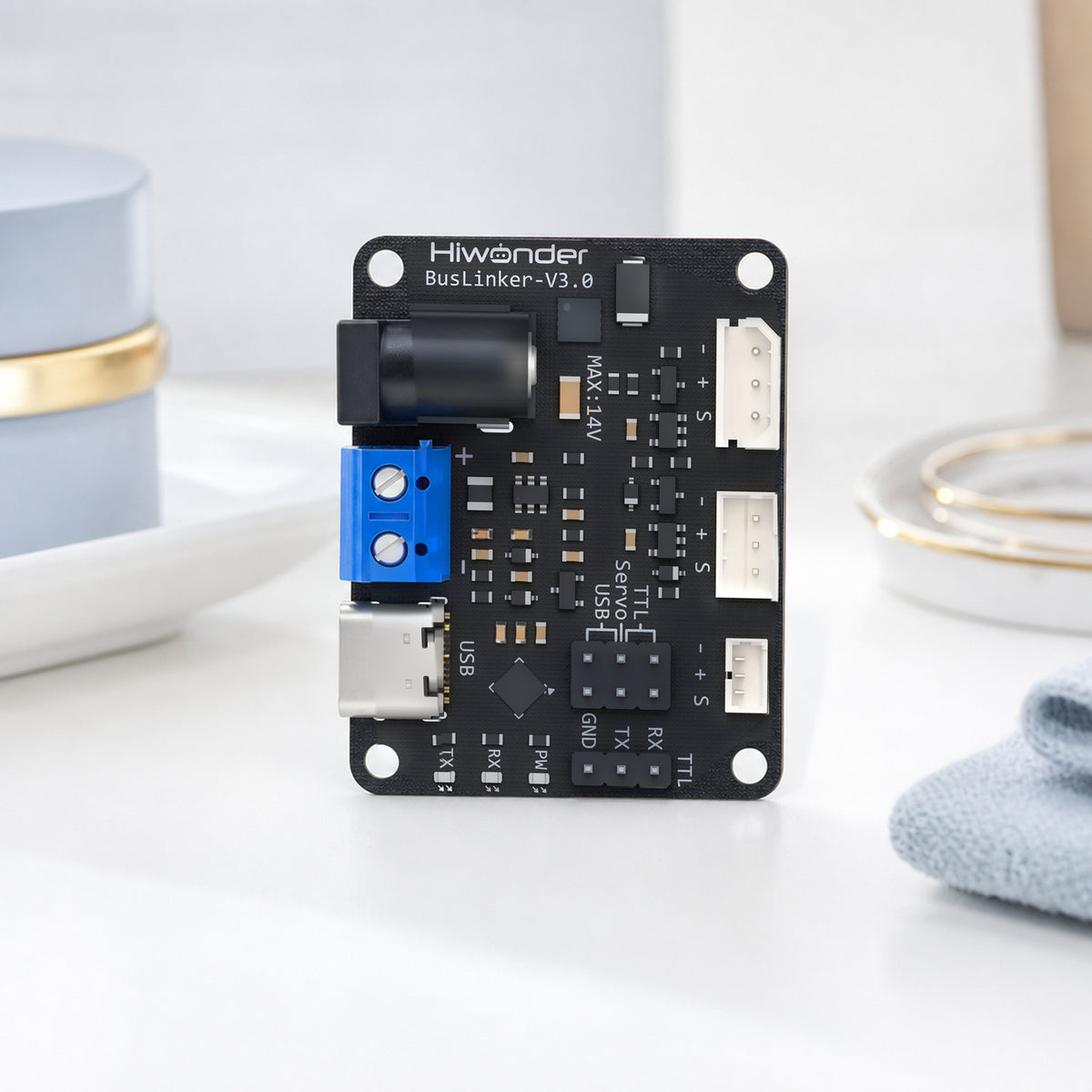
The BusLinker V3.0 is a small USB-to-servo-bus interface board that powers and talks to half-duplex TTL bus servos (Hiwonder HX series, Feetech STS / SCS), letting a PC, Raspberry Pi or microcontroller set servo IDs, read positions and drive a whole chain of servos through a single serial port.
BusLinker V3.0 is the USB servo interface board that ships with the SO-ARM101 kits. Plug it into a laptop over USB-C, feed it 12 V, and it exposes the servo bus as a serial port that LeRobot, the Hiwonder PC tool or your own Python script can talk to. Useful as a spare, for a second arm, or for any project using Feetech-protocol bus servos.
What can you use it for?
- Spare or second controller for an SO-ARM101 leader or follower arm
- Bench tool for setting IDs, zero offsets and angle limits on new servos before building an arm
- USB servo interface for custom LeRobot robots, grippers, pan-tilt heads and hexapods
- Bridging bus servos to an ESP32, STM32 or Arduino over the TTL header
Who is it for?
SO-ARM101 and LeRobot builders, students and makers using Feetech-protocol bus servos who need a reliable USB interface with proper power handling.
Compatibility
- Servos: Hiwonder HX-10HM / HX-30HM / HX-65HM, Feetech STS3215, STS3250, SCS series and other 3-pin half-duplex TTL bus servos
- Hosts: Windows, Ubuntu, macOS (USB serial), Raspberry Pi, Jetson; TTL header for Arduino, ESP32, STM32
- Software: Hiwonder servo PC tool, Hugging Face LeRobot, Feetech SDK, custom Python via pyserial
- Power: 5–14 V DC barrel jack or screw terminal; use 12 V 5 A for a six-servo arm, 7.4 V for 7.4 V servos
Specifications
| Model | Hiwonder BusLinker V3.0 |
|---|---|
| Function | USB-to-serial bridge and power distribution for half-duplex TTL bus servos (Hiwonder HX / Feetech STS / SCS) |
| Host interface | USB-C (virtual COM port) or 4-pin TTL header (TX / RX / GND / 5 V) for MCU control |
| Servo ports | 3 × 3-pin bus servo headers (parallel), daisy-chain more servos through the servos themselves |
| Power input | 5–14 V DC via 5.5 × 2.1 mm barrel jack or screw terminal; powers the servo bus directly |
| Max current | Depends on supply; 12 V 5 A adapter recommended for a 6-servo arm |
| Baud rate | Custom, up to 1 Mbps |
| Software | Hiwonder PC servo tool (ID, offset, limits, real-time graphs); works with LeRobot's Feetech motor bus |
| Size / weight | 42 × 33 × 15 mm, 10 g; 36 × 28 mm mounting holes |
| Sample code | Python, Arduino, ESP32, STM32, Raspberry Pi, Jetson examples |
What's in the box
- Default Title: 1 × BusLinker V3.0 board (no cables or power adapter)
Frequently asked questions
Is this the board inside the SO-ARM101?
Yes. Each SO-ARM101 arm has one BusLinker V3.0 in its base connecting the six servos to the PC. This listing is the bare board for spares, second arms or custom builds.
How do I connect it?
USB-C to the computer, 12 V into the barrel jack or screw terminal, and the servo chain into any of the three 3-pin ports. The board appears as a serial port; select it in LeRobot or the Hiwonder servo tool.
Can it power the servos?
Yes. The DC input feeds the servo bus directly, so choose an adapter matched to your servos: 12 V for HX-30HM / STS3215-C018, 7.4 V for the 7.4 V models. USB alone does not power servos.
Does it work with Feetech STS3215 servos and LeRobot?
Yes. The protocol is the same Feetech half-duplex bus that LeRobot's motor driver uses; set the port in your robot config and it works like any other Feetech adapter.
Can I use it without a computer?
Yes. The 4-pin TTL header (5 V, GND, TX, RX) lets an Arduino, ESP32 or STM32 drive the bus. Sample code for each platform is provided.
Share